
Wholesale bags / VISUAL BUYER GUIDE
How to Create SKUs for a Mixed Handbag Lot: A Reseller Template
For a mixed handbag lot, give each distinct received bag a short internal SKU, then use that same code on its label, photo file and inventory row. Start with one row per item when styles vary; only combine quantities after checking that the items are truly identical. Download the 12-row example below to try the system before you label your own stock.
Put this guide to work.
Download the free checklist or template, then follow the steps below. No email required.
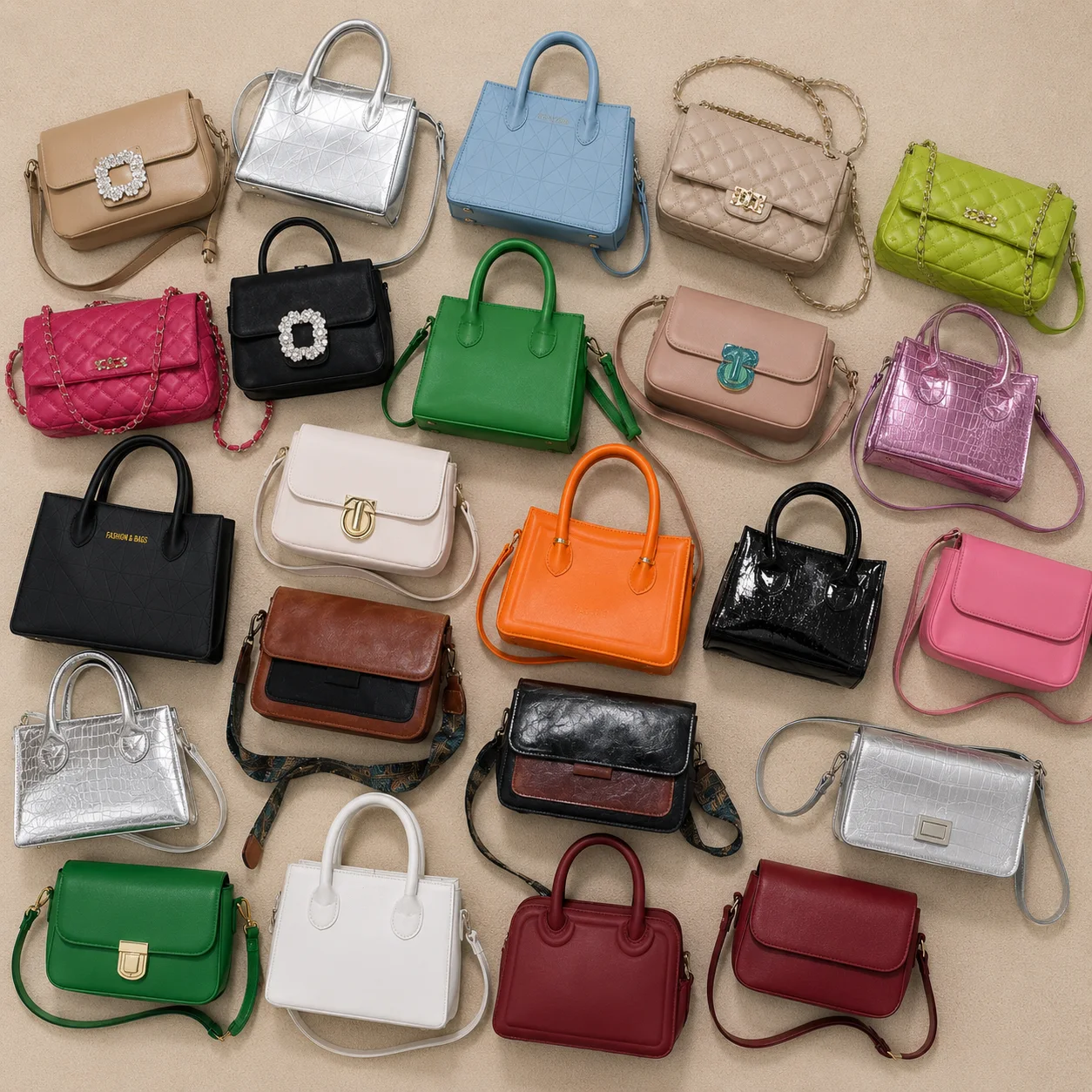
Two black shoulder bags can look almost the same in a thumbnail. Then an order comes in, and you have to remember which one had the smaller buckle. A SKU (stock keeping unit) is your own inventory code: it connects the item you checked with the listing your customer saw. Keep three things in sync: the label, the photo and the record. Keep the code stable when a bag moves shelves. Keep anything reserved or awaiting review out of the available count.
Give the label, photo and row the same code
- 01
Pick a simple pattern
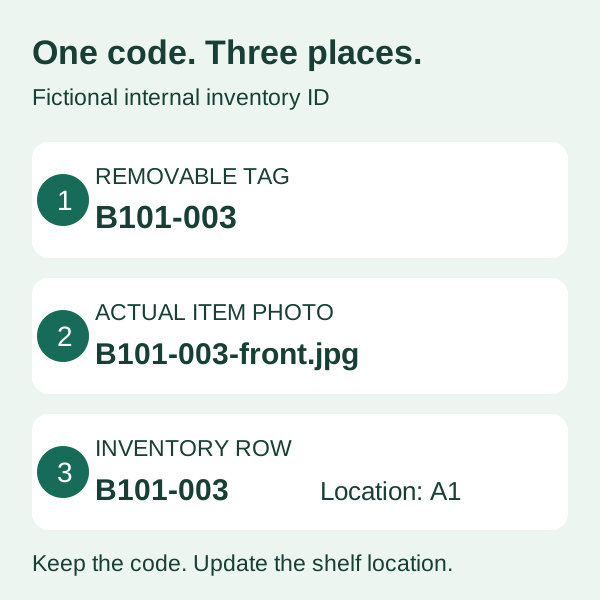
For this fictional example, B101 identifies the batch and 003 identifies one item: B101-003. Use short letters and numbers with a dash. Avoid spaces, commas and easily confused letters such as O and I. Your code needs to work for your team; it does not need to describe every feature of the bag.
- 02
Attach it without damaging the bag
Put the code on a removable tag or the individual storage bag. Check how the tag attaches before using it. Do not stick an untested adhesive directly onto the product. Record the shelf location in its own column so moving stock does not force you to rename the SKU.
- 03
Name the actual item photos
Use B101-003-front.jpg, B101-003-back.jpg and B101-003-inside.jpg for photos of that received item. Our CSV records the front filename; keep the other views under the same prefix. Supplier assortment photos cannot tell you which individual bag is in your storage box.
This is an internal numbering method. A SKU is different from a barcode or a marketplace GTIN; do not invent official identifiers by copying this pattern.
Try the 12-row inventory template
Download and replace the examples
The sample and blank CSV downloads are under Sources & further reading below. Open a copy in your spreadsheet app. The sample contains 12 fictional items, not Yumiao stock. Delete its example rows before recording goods you have actually received and checked.
Read the two quantity columns correctly
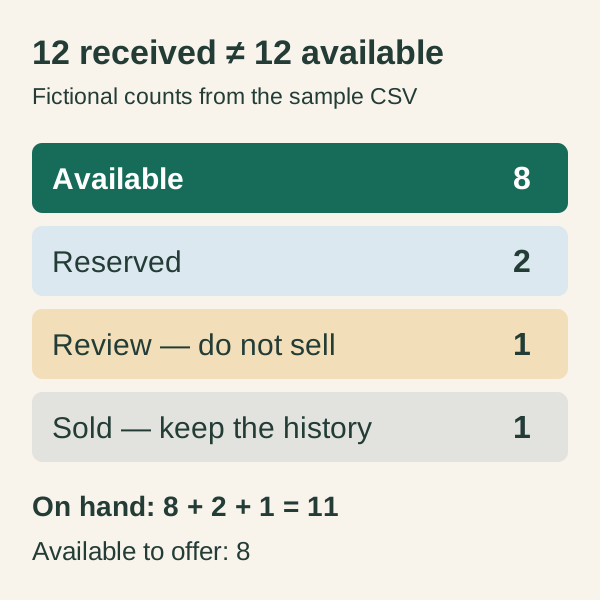
received_qty is the original quantity recorded at receipt. available_qty is what you can offer now. In the sample, all 12 rows have received_qty 1, but only eight have available_qty 1. Two are reserved, one is awaiting review and one is sold. The sold row stays as a historical record.
Use a status you can act on
Available means ready to offer. Reserved means held for a customer under your stated hold policy. Review means do not sell until the open question is resolved. In this simplified example, the sold item has already been handed over or dispatched. Reserved and review goods are still physically on hand, so 11 items remain on hand while eight are available.
The example omits returns, cancellations and goods in transit. If those occur, add a dated movement log and reconcile it with your physical count; do not silently overwrite receipt history.
Keep similar bags separate until you check them
- 01
Looks similar: separate records
Two tan bags can differ in closure, measurements, strap or condition. Give them separate codes until you have checked the actual items. A matching color or supplier group photo is not enough to treat them as the same listing.
- 02
Verified identical: shared SKU can work
If multiple received items match the variant and condition you sell, one SKU with a quantity can be practical. Check them first, use accurate listing photos and keep any item-level exception separate. Our starter template uses one item per row to make a varied batch easier to trace.
- 03
Unknown details: leave them unknown
Record an observed color using a consistent name and check it in sensible lighting. Leave unverified material or brand claims out of your code and listing. A photo cannot confirm leather composition, authenticity or a repeatable supply of that design.
Update the record before you offer the bag again
- 01
When you list
Copy the internal code into your listing record wherever your selling channel supports it. Use the same code across channels for the same physical item. Check each channel’s identifier rules separately. For a manual system, make one inventory sheet the place you update first.
- 02
When you hold or sell
Change the status and available quantity promptly, then update the other channels where that same item is offered. A spreadsheet does not automatically synchronize listings. If a hold expires, check the item is still present and ready before making it available again.
- 03
When you receive a different bag
Issue a fresh code. Do not reuse a sold item’s code for a different design just because it arrives in the same color. Keep the old row so a later order question still leads to the right photos. Store customer contact details in your order system, not in this shareable inventory template.
Run a five-minute find-it test
Start with a photo
Pick one front photo at random. Can you find its row from the filename, then find the exact bag using its location and tag? If not, fix the missing link before adding more listings.
Start with a bag
Read its tag and open the matching photos. Check that the row describes that item and that its status matches reality. A second person can try the same test without relying on your memory.
Start with your available total
Filter available_qty above zero and count those items physically. Keep held and review items separate. In our example, finding 11 bags in storage does not mean 11 are available to advertise: three are reserved or under review.
Buyer questions
Can I use the supplier’s SKU for my mixed handbag lot?
Keep a supplier reference in a separate column if one is supplied and clearly identifies the item. For a varied mixed lot, your own internal codes can connect the individual goods you received to your photos and listings. Do not assume a range reference identifies every bag inside it.
Does every bag always need a different SKU?
No. Identical units of the same verified variant can share a SKU and quantity. For a mixed lot containing many different items, one code per distinct item is a simple starting point. Separate condition or feature differences that affect what a customer will receive.
Is the template a barcode or an automatic stock system?
Neither. It is a CSV inventory worksheet with internal example codes. It does not create GTINs, authenticate products or synchronize your selling channels. Check marketplace requirements and your actual stock separately.
Can Yumiao send the exact styles shown in the example?
The CSV and diagrams are fictional teaching examples. Yumiao’s featured ranges are random mixed assortments with a 50-bag minimum; individual styles and colors cannot be selected. Discuss the current range and order terms before buying.
Sources & further reading
Yumiao-specific details reflect our published service information. External references provide general background.
HOW YUMIAO CAN HELP
Put the guide to work.
Use the free worksheet to decide whether item-by-item inventory fits your selling workflow. If you are considering a Yumiao mixed lot, review the random-assortment rules and ask for current representative photos of the range. Confirm order details in writing; example photos do not reserve specific styles.
Products, availability, minimum quantities and order arrangements are confirmed individually.